
WooCommerce Can Be Fast: A Performance Guide That Actually Works
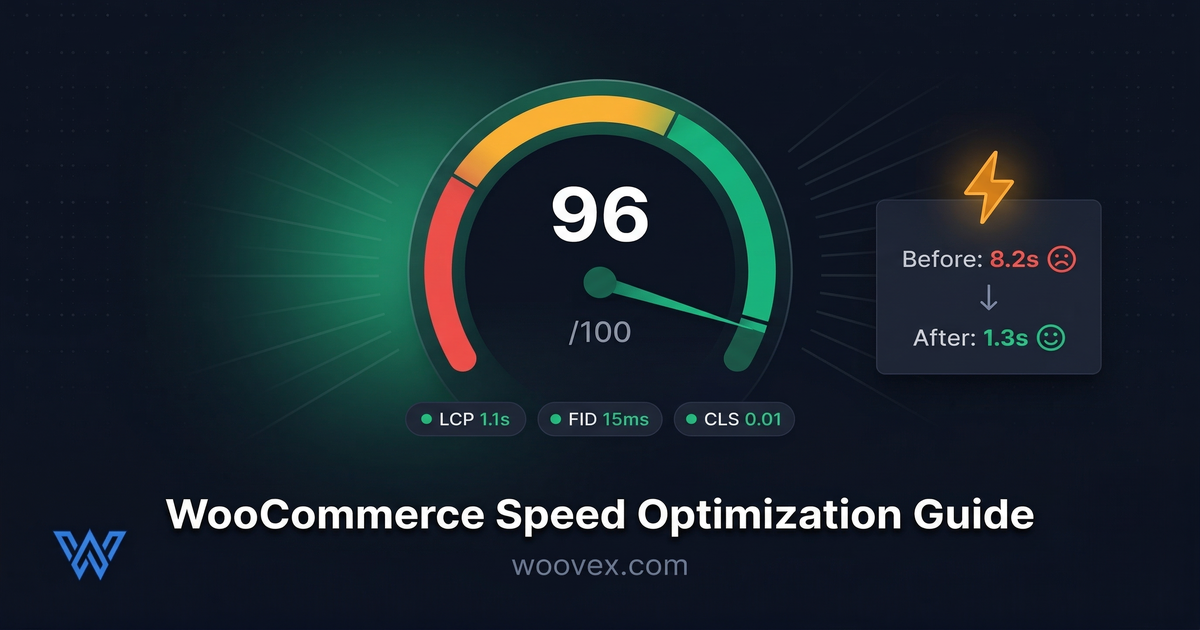
"WooCommerce is slow." You've likely heard this, possibly even experienced it firsthand. But here's the thing: WooCommerce itself is not slow. A poorly configured WooCommerce store is slow. A well-configured and optimized WooCommerce store loads in under 2 seconds and scores 90+ on PageSpeed Insights. It's entirely possible to get great Core Web Vitals scores with your WooCommerce store using the correct WordPress performance optimization strategy.
Why Speed Matters More Than You Think
A one-second delay in page load time can lose you around 7% in conversions. This means that if you make $10,000 per month, you can lose around $700 per month because of page speed. This is around $8,400 per year because of a page that takes too long to load.
WooCommerce is part of Google’s ranking algorithm, and page speed is taken into consideration. If you have a slow store, you’ll rank lower and get fewer visitors and fewer conversions.
But it’s not just about the money. A slow site is a site that’s not trusted. If you’re waiting 4 or 5 seconds for a site to load, you start wondering if the site is legitimate, if they’ll really take care of you with your order, if you’ll really get your products on time. Speed is important because it’s a matter of trust.
Start With Hosting (This Is 50% of the Problem)
The single biggest factor for WooCommerce speed is the hosting. Knowing what WooCommerce actually costs helps you plan for fast WooCommerce hosting instead of cutting corners. A $3/month shared hosting plan is not going to give you fast page loads. You're sharing the server with hundreds of other sites, and WooCommerce uses dynamic PHP pages that need processing power.
What to look for in hosting:
- PHP 8.2+ - Speed improvements are available with each version of PHP. PHP 8.2 is approximately 3 times faster than PHP 7.4.
- Server-level caching - NNginx with FastCGI caching and/or LiteSpeed Cache. These are server-level caching solutions, which are much faster than relying on plugin-level caching alone.
- SSD/NVMe storage - For fast database queries. This matters a lot for stores with thousands of products.
- Dedicated resources - At a minimum, a VPS or managed WordPress host. Shared hosting is perfectly good for a blog, not a store with orders being processed.
Moving from shared hosting to quality managed hosting typically cuts load times by 50-70% with zero other changes. It's the highest-impact single fix you can make. This is true regardless of platform, though as we cover in our WooCommerce vs Shopify comparison, WooCommerce gives you a huge amount of control over your hosting stack.
Caching: The Non-Negotiable
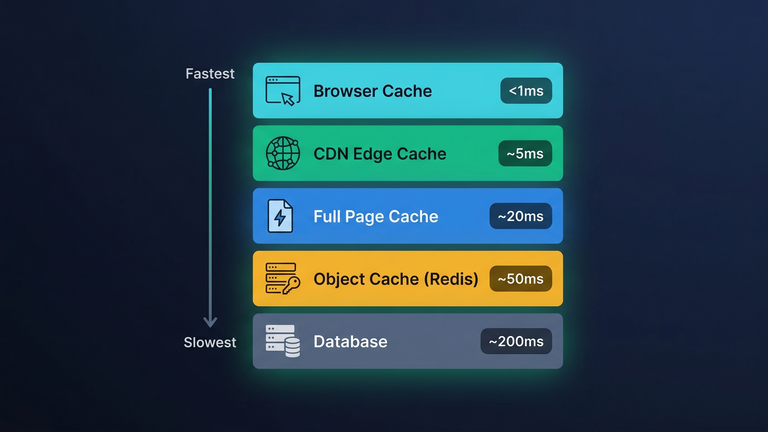
Normally, WooCommerce uses PHP to generate pages. This means that, without caching, each page visit is like a first visit. Caching is like storing the results of the visit, allowing the visitor to access the page instantly.
The Three Caching Layers You Need for WooCommerce:
- Page caching: This caches the entire HTML page. When a visitor requests a page, instead of waiting for the page to load, he gets the cached page. This alone can speed up your store by 5-10 times for return visitors.
- Object caching (Redis or Memcached): This caches database results. Instead of querying the database for the same product information, it gets it from the cache. A huge time saver for product-heavy sites.
- Browser caching: This stores images, JavaScript, and CSS locally. This means the visitor’s browser loads the page almost instantly for the second and third visits.
The Important Caching Rules for WooCommerce:
- Never cache the cart, checkout, or my account pages. They are dynamic, meaning the information is different for each visitor.
- Never cache pages for logged-in users if the information is different for each user.
Database Optimization
WooCommerce stores collect a lot of bloat in the database. Post revisions, expired transients, old order logs, spam comments, etc., all contribute to slower database queries.
Quick database wins:
- Limit post revisions: Add the following to your wp-config.php file:
define('WP_POST_REVISIONS', 5);. No longer will WordPress store an unlimited number of drafts for every product and every page. - Clean expired transients: WooCommerce stores temporary cached information that sometimes doesn't clean up after itself. Clean this information monthly with WP-Optimize or a similar plugin.
- Optimize database tables: Like a hard drive, database tables fragment over time. Optimizing monthly will help.
- Clean old logs: WooCommerce stores a lot of logs from the API, error logs, etc. Clean everything older than 30 days.
For stores with 5,000+ products, database optimization can save you 30-50% on query times. Not the most glamorous solution, but it works.
Images: The Silent Speed Killer
Images are the heaviest components of any given ecommerce page. A single image, if unoptimized, can be as large as 2-5 MB. Now, if we're talking about a page that has 20 images, that’s a total of 40-100 MB just for images.
How to fix it:
- Next-gen image formats: WebP, AVIF, etc. - these are 25-50% smaller than JPEG at the same level of quality. Most image hosts and CDNs will automatically convert images to these formats.
- Lazy loading: Load images only when the user scrolls down. Products that are out of the viewport shouldn't affect the page load time.
- Proper Image Dimensions: Don’t upload an image at 4000x3000 pixels, then use CSS to resize it to 400x300 pixels. Upload the image at the right dimensions.
- Image Compression: Use tools like ShortPixel or Imagify, which compress images by 40-70% without affecting the image quality at all. A store we optimized recently went from 8.2 MB to just 1.1 MB page weight. Load time went from 6.8 seconds to just 1.9 seconds.
The Plugin Problem
Plugins are loved in WooCommerce stores. And each plugin comes with code to be executed during page load.
We've audited stores with 60+ active plugins installed. Some of those plugins were loading 5-10 additional CSS and JavaScript files. That's a hundred+ additional HTTP requests before page rendering even begins.
Plugin health rules:
- Audit your plugins quarterly: Disable a plugin and test page speed. You'll notice some plugins have a minimal impact, while others add 1-2 seconds to your page load.
- Opt out of heavy plugins in favor of lightweight alternatives: Some social sharing plugins require 500KB+ of JavaScript code. You could write a few lines of custom plugin code to do the same thing with a fraction of the performance impact.
- Avoid "all-in-one" plugins: Plugins claiming to do SEO, caching, security, and optimization are likely to do all of these features poorly. Use specialized tools.
- Update your plugins regularly: Developers are constantly pushing performance-enhancing updates to their plugins. You're not getting those performance benefits if your plugins are outdated.
The goal: less than 25 active plugins for most sites. If you need 30+ plugins, ensure that each one is earning its keep. Real WordPress performance optimization can mean replacing three bloated plugins with one well-designed plugin.
Measuring Your Results
Optimizing without measuring is just guessing. Here are the things you should measure:
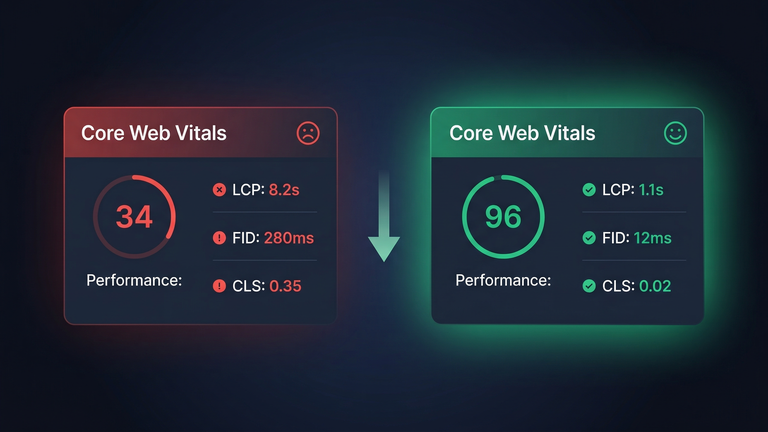
- Google PageSpeed Insights: It is free, and it will give you a score along with recommendations. Your score should be at least 90 for mobile devices.
- WooCommerce Core Web Vitals Targets: Your store should have an LCP (Largest Contentful Paint) of less than 2.5 seconds, INP (Interaction to Next Paint) less than 200 milliseconds, and CLS (Cumulative Layout Shift) less than 0.1.
- TTFB (Time to First Byte): This measures the time it takes for the server to respond. Ideally, it should be less than 200 milliseconds. If it is more than 600 milliseconds, it is a problem with the server or the hosting service.
- Real user monitoring: This is where you use PageSpeed Insights, but instead of the Google server, it is run from your server. However, the results may vary for actual users. You can use Google Analytics or Cloudflare for this.
If you are targeting international users, it is best to test from different locations. A store may load fast if you are based in New York but may take a long time if the customer is based in London.
The stores we optimize improve from 3-8 seconds to under 2 seconds. This means not only do we see increased conversion rates, better SEO rankings, and a store that simply feels better to use, but it also means WooCommerce page speed is not a "nice to have," it's a "need to have" when it comes to increasing your bottom line. If you'd like some help increasing your scores, we also provide a our WooCommerce performance optimization service.
Want Us to Speed Up Your Store?
We optimize WooCommerce stores for speed. Our clients typically see 40-60% faster load times. Server tuning, caching, database optimization, image compression, and code cleanup.