
Ecommerce Pricing Strategy: How Clear Pricing Drives More Sales
Your pricing is one of the most powerful conversion tools you have at your disposal. It's not just the actual amount you charge, but how you present that pricing to your customers as well. Customers who understand what they're paying for convert at a significantly higher rate than those who don't. And uncertainty kills more sales than high pricing does.
Why Transparency Beats Tricks
Consumers who care about pricing algorithms that change prices in a way they don't understand? 64%. These numbers should give you pause before you implement a black box pricing system.
The stores that win with pricing aren't the stores with the lowest price. They're the stores with the most transparency. Because the customer knows exactly what they're paying for and exactly why they're paying for it.
This doesn't mean you can't be smart about your pricing. It means every price should feel fair and understandable. No hidden fees until the last minute. No confusing pricing tiers. No need to say "call for pricing" when you could just tell them the price.
Think about the last time you walked away from a purchase. What do you think it was? Was it because the price was too high? No, it was because something just felt wrong. A surprise shipping charge. A unclear add-on charge. A coupon that works the wrong way. A feeling of "I'm not sure what I'm really being charged." This is the opposite of conversion optimization.
Show the Full Price Early
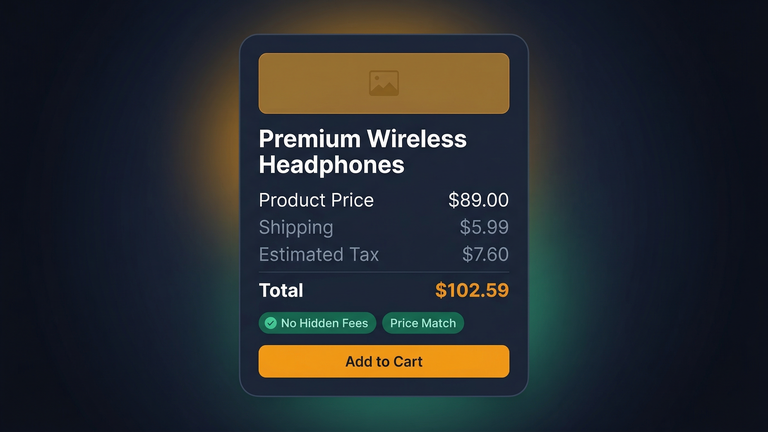
The single biggest reason for cart abandonment is the occurrence of unexpected costs at the time of checkout. Shipping costs, taxes, and handling charges are the reasons for cart abandonment more than any other single factor. If you haven't already, it is highly recommended that you read our guide to checkout optimization for a detailed analysis of the topic.
What to do instead:
- Show estimated shipping cost on the product page ("Ships for $5.99" or "Free shipping over $50")
- Include tax in displayed prices, or clearly show "+ tax" next to every price
- If you offer free shipping with a threshold, show a progress bar: "Add $12 more for free shipping"
- Never add surprise fees at checkout that weren't visible on the product page
Stores that show the total cost upfront, including shipping costs, report less cart abandonment. This is because the customer is made aware of what they're getting themselves into before they mentally commit to purchasing the product. This kind of conversion optimization starts with transparency on every product page.
Anchor Pricing Without Being Deceptive
Price anchoring is a thing, and it actually works. It makes sense to list a higher "original" price next to a lower "sale" price because it makes the "sale" price seem more reasonable.
Of course, there are limits to this approach. If your "original" price was not actually charged, people are bound to notice sooner or later. And with review sites and price comparison tools, they may notice sooner than you think.
Honest ways to use anchoring:
- Show genuine previous prices with a "Was $X, now $Y" format
- Display the per-unit savings for bulk purchases
- Compare to a well-known alternative ("Similar product at [Brand]: $X")
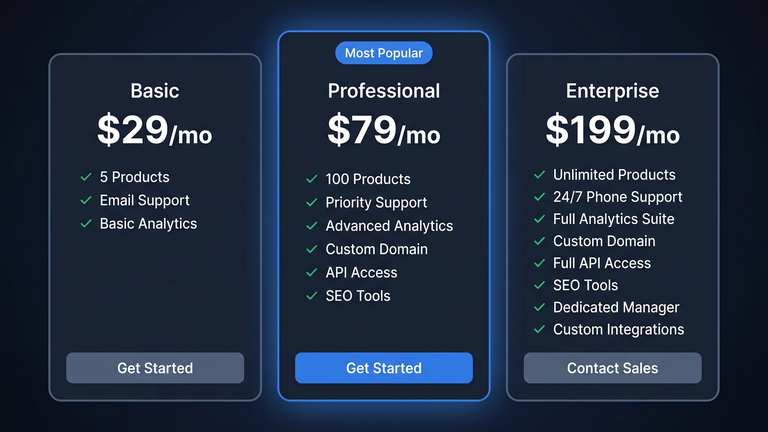
- Use tiered pricing to make the middle tier look like the best value
The goal isn't to trick anyone. It's to give customers context for the price they're seeing. Context makes decisions easier.
Tiered and Volume Pricing Done Right
If you sell to both consumers and businesses, only having one price point can be limiting. Offering different price points can be done without confusing anyone.
Common tiered pricing approaches:
- Good / Better / Best: Three clear tiers. Most customers pick the middle one. This works for subscriptions, service packages, and product bundles.
- Volume discounts: Buy 1-9 at $10, 10-49 at $8, 50+ at $6. The pricing table should be visible on the product page, not hidden behind a "contact us" form.
- Role-based pricing: Wholesale customers will see wholesale prices. Retail customers will see retail prices. B2B Pricing WooCommerce sites work well with the right plugins. There are WooCommerce plugins specifically designed for B2B pricing.
The secret to successful price tiers is to make the value of each price point obvious. Don't leave your customers to guess which price point is the one they need.
Dynamic Pricing With Guardrails
AI-driven dynamic pricing is growing rapidly. There is a need to set boundaries for AI-driven pricing. Pricing based on customer demands is good. Pricing based on the level of desperation of the customer is a recipe for negative customer reviews.
Smart dynamic pricing strategies:
- Inventory-based markdowns: Automatically reduce price when stock is sitting too long
- Seasonal adjustments: Higher prices during peak demand, lower during slow periods
- Loyalty rewards: Better prices for returning customers (transparent: "Members save 10%")
- Time-limited offers: Flash sales with clear start and end times
What to avoid:
- Changing prices based on individual user data (browsing history, device type)
- Different prices for the same person at different times without explanation
- Price increases when competitors are out of stock
If you can't explain your pricing logic to a customer and have them nod along, the logic is wrong.
Pricing Psychology That's Not Manipulative
There are pricing strategies that can help you influence customers’ decisions without tricking them:
- Charm pricing ($49 vs $50): It still works. It’s the left digit that influences perception. Use it only with mid-range products and not with premium products.
- Round numbers for premium ($500 vs $499): Round numbers are perceived as premium numbers. Use $500 if you’re selling a premium product, and $499 if you’re selling a regular product.
- Price per day/use: "Just $2.50 per day" is a different way to look at a $75/month subscription service. This tactic is especially effective for subscription and recurring billing products. But only use this if the math checks out and makes sense.
- Decoy pricing: Offering three pricing options with the middle option clearly being the best value. This is expected behavior.
The difference between psychological pricing and manipulation: Psychological pricing is about helping customers make a decision based on value. Manipulation is about hiding information or creating a false sense of urgency. Customers can tell the difference.
Building Your WooCommerce Pricing Strategy
To get you started with a specific example:
- Start with auditing your existing pricing structure. Are costs clearly displayed on the product page? Are there nasty surprises at the checkout stage? Fix those first.
- Include shipping costs on product pages. This alone can help reduce cart abandonment.
- Implement role-based pricing if you serve both B2B and B2C customers. Don't ask wholesale customers to contact you for pricing information.
- Develop a pricing table for products with different pricing structures or options.
- Test a change to your pricing structure by introducing a single change and running it for 2-4 weeks to measure the effect on conversion rates and average order value.
WooCommerce allows you to implement virtually any pricing strategy you can imagine. A WooCommerce pricing plugin can handle dynamic rules, while a dedicated product price calculator lets customers configure exactly what they need. Role-based pricing, volume discounts, B2B pricing WooCommerce setups, and more are all possible. The platform isn't the limitation. The strategy is what matters.
Start with the obvious. Ensure every customer knows exactly what they will pay before they start the checkout process. That alone will help you achieve a higher conversion rate than any pricing trick.
Need Custom Pricing for Your Store?
We create pricing calculators, product configurators, dynamic pricing solutions, and wholesale business solutions for WooCommerce. Every solution is custom-built to meet your business needs.